Sequence Database Setup: NCBI EST
| EST_others |
| As of April 2009, the compressed EST_others file from NCBI was 8.3 GB
and the unpacked Fasta was 32 GB. Address space constraints
mean that it is no longer possible to memory map this file or to build a taxonomy index when running 32-bit
Mascot executables. This includes the Windows version of Mascot 2.2 even when running under 64-bit Windows.
Given sufficient disk space and up-to-date utilities,
you should still be able to search EST_others, provided you configure without memory mapping or taxonomy.
NCBI have no plans to split EST_others, so a more practical alternative is the set of 10
EMBL EST files,
which are more evenly divided. As of April 2009, the largest (plants) was 3.3 GB compressed and 13 GB unpacked.
If you are interested in the EST sequences of a specific organism, another possibility is to create a
custom database as follows
- Search for your organism using the
NCBI taxonomy browser,
then click on organism name to get more information.
- On the information page, at the top right,
is a table of links to Entrez records. If there isn't an entry for Nucleotide EST, or if the number of ESTs is
very small, you'll want to climb up the lineage to a more general level, such as the class or phylum.
- When
the Nucleotide EST link shows a reasonable number of records, click on it.
Here, for example, is the information page for
Porifera (sponges).
- On the Entrez Nucleotide page, from the display drop-down list, choose FASTA
- From the send to drop-down list, choose File and save the file to disk (may take a while).
This is a fasta file suitable for use with Mascot. Configure as shown below but with taxonomy set to
--- None ---
|
|
Overview
Three EST databases are compiled by the
NCBI (National Center for Biotechnology Information) for Blast searches. They
contain "single-pass" cDNA sequences, or Expressed Sequence Tags, from the EST divisions of
GenBank.
There are currently three EST databases: human, mouse, and others. This document uses the "others" database
as an example. To work with the human or mouse databases, simply substitute the word "human" or
"mouse" for "others". For example, the human
compressed Fasta file is est_human.gz, the db_update.pl keyword is EST_human_from_NCBI, the recommended
Mascot name is EST_human, etc.
Download
ftp://ftp.ncbi.nih.gov/blast/db/FASTA/est_others.gz
for the latest release.
To download updates automatically, the relevant definition block in
db_update.pl is EST_others_from_NCBI.
Note that versions of wget up to 1.10.x have problems with files larger than 2 GB on 32 bit platforms. The
current stable release, 1.11.4, works correctly.
Windows binaries can be downloaded from Christopher G. Lewis. There is no installer; just unpack the files into a directory
on the system path.
Taxonomy
Taxonomy for NCBI EST databases is predefined in mascot.dat. For EST_others, choose
"dbEST FASTA using GI2TAXID". The following taxonomy files are required:
ftp://ftp.ncbi.nih.gov/pub/taxonomy/gi_taxid_nucl.dmp.gz
ftp://ftp.ncbi.nih.gov/pub/taxonomy/taxdump.tar.gz
Note that the taxonomy files go into the taxonomy directory, not into the sequence database
directory. Also, some files need to be unpacked (using tar) as well as uncompressed.
There is no value in building taxonomy indexes for human or mouse because these are single organism
databases.
Unigene
The NCBI UniGene
indexes are created by automatically partitioning GenBank sequences into non-redundant sets of
gene-oriented clusters. If UniGene indexes are available locally, results from Mascot searches of
EST databases can be grouped and reported by gene family, rather than by raw EST accession numbers.
To enable UniGene indexes, uncomment the following line, near the top of the
db_update.pl script:
# $local_unigene_directory = "$MASCOT/unigene";
This will cause the required UniGene indexes to be downloaded when the EST databases are next updated.
You will also need to uncomment the relevant lines in the UniGene block of mascot.dat. For example:
# human c:/inetpub/mascot/unigene/human/current/Hs.data
# EST_human human
The links to generate species based UniGene reports will then appear just above the "Repeat Search" buttons
on the Peptide Summary report.
Parse Rules
A typical Fasta title line is:
>gi|16764|emb|Z17609.1|Z17609
ATTS0183 Gif-SeedA+B Arabidopsis thaliana cDNA clone YAP043T 3'
The gi number is the most reliable identifier. Suitable parse rules are:
Accession from Fasta title: ">\(gi|[0-9]*\)"
Description from Fasta title: ">[^ ]* \(.*\)"
If an entry in EST_others represents multiple source database entries, the Fasta title lines are concatenated
together with CTRL+A as the delimiter.
Configuration
For this example, est_others.gz was downloaded to a folder named
C:\Inetpub\MASCOT\sequence\EST_others\current.
The file was decompressed using gzip,
and renamed to EST_others_20020601.fasta.
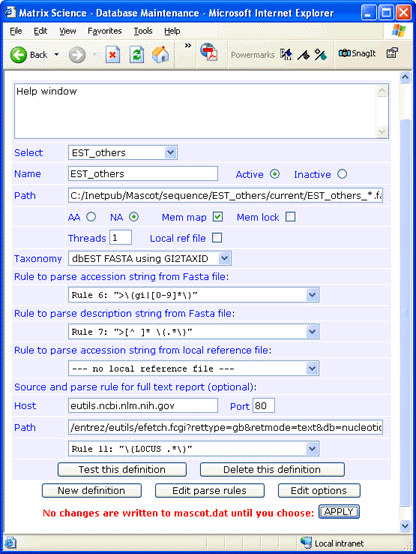
There is no downloadable full text file for EST_others, but full text for individual entries can be retrieved across the web
from the NCBI Entrez server. The syntax
for the Path field is:
/entrez/eutils/efetch.fcgi?rettype=gb&retmode=text&db=nucleotide&tool=mascot&id=#ACCESSION#
If you don't require full text in a Mascot Protein View report, simply leave the Host, Port, and Path fields blank
and choose
--- no full text report ---
in the drop down list.
Always test a new definition before applying the changes to mascot.dat.
|